How to Chill Smarter This Summer (And Keep More Money in Your Pocket)
CONSERVATION JUNE 1, 2026
At A Glance (TL;DR)
Too busy to read? Scan this. Each tip is expanded below.
Change your AC filter — Dirty filter = HVAC works harder; biggest ROI for 10 minutes of your time
Pre-cool before 3pm — So AC runs less during peak-rate hours (3–7pm)
Run appliances after 9pm — Off-peak TOU rates mean lower cost per kWh
Set AC to 76–78°F, not 70°F — Every degree above 72°F saves ~3% on cooling
Flip ceiling fan direction counterclockwise — Wind-chill effect lets you raise thermostat 4°F
Drop water heater to 120°F — Factory default of 140°F wastes energy 24/7
Enable water heater vacation mode — Easiest summer hack almost nobody uses
Clean your refrigerator coils — Dusty coils make your fridge work up to 25% harder
Check fridge/freezer temps — Fridge: 35–38°F · Freezer: 0°F — wrong settings waste energy or food
Close south- and west-facing shades before noon — blocks up to 45% of afternoon solar heat gain
It pays to play it cool this summer. Literally.
The average American household spends about $2,000 a year on home energy — and HVAC accounts for nearly half of that, according to the U.S. Energy Information Administration. That's roughly $900–$1,000 just to keep your home heated and cooled. When summer heat spikes, so does that number.
The good news: you don't need new equipment, a contractor, or a major investment to push those costs down. Everything in this post works with what you already have. These are practical, low-effort adjustments that add up to real savings — starting today, without sacrificing comfort.
1: Timing Is Everything
Pre-Cooling + Off-Peak Hours — The Strategy That Pays Twice
Most people respond to heat reactively — the house gets hot, they crank the AC. That's the most expensive way to stay cool, and here's why.
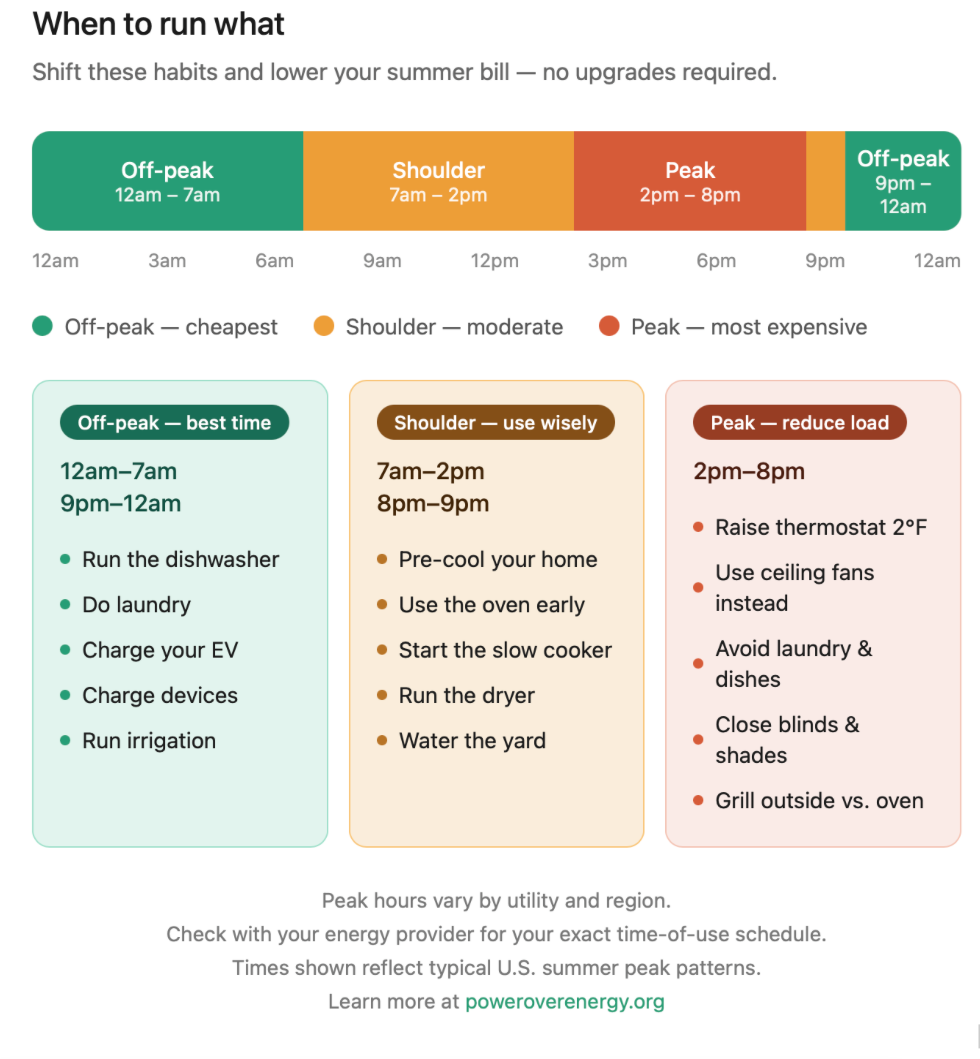
Peak hours — typically 3–7 pm — are when grid demand surges and, if you're on a Time-of-Use (TOU) rate plan, the cost of every kilowatt-hour you consume goes up. Many utilities have already shifted residential customers to TOU pricing, and more are moving in that direction. If you're not sure whether your plan has peak/off-peak pricing, a quick call or login to your utility account will tell you.
The pre-cooling strategy is simple:
Check the forecast the night before (or morning of).
Set your thermostat 2–3°F lower than your target comfort temp between 11 am and 2 pm — before the hottest part of the day.
Let your home's thermal mass (walls, floors, furniture) absorb that coolness.
Let the thermostat drift up slightly during peak hours — your AC barely has to run.
Your home becomes a battery. You're storing "cool" when electricity is cheapest and spending it when rates are highest.
One move that supercharges the pre-cooling strategy: close your blinds and shades on south- and west-facing windows before midday, before the afternoon sun angle drops and starts driving heat directly through the glass. The DOE estimates that closing window coverings can reduce solar heat gain by up to 45% — which means your pre-cooled home stays cooler longer with no extra AC run time. You're not blocking the light forever, just during the 11 am–4 pm window when it does the most thermal damage.
The off-peak companion move: Schedule your dishwasher, laundry, and EV charging to run after 9 pm. These loads are small individually but add up — and running them during peak hours means paying a premium for energy you could use for less. Most modern appliances have built-in delay timers. ENERGY STAR recommends this load-shifting behavior as one of the highest-impact no-cost changes for reducing summer bills.
Pro tip: Check your utility's app or website. Many now offer free home energy reports that show exactly when your household uses the most power — and what it's costing you by the hour.
2: Your AC Is Probably Working Too Hard
The Filter, The Fan, and the Thermostat — Three Fixes That Work Together
Start Here: Change Your Air Filter
HVAC accounts for nearly half of your annual energy bill. A clogged air filter forces your system to work harder to pull air through, which means longer run times, more energy consumed, and more wear on equipment that costs thousands to replace.
The U.S. Department of Energy estimates that replacing a dirty, clogged filter can lower your air conditioner's energy consumption by 5–15%. In summer, when your system is running nearly constantly, that adds up fast.
How often? Check it monthly during peak cooling season. Standard 1-inch filters typically need replacement every 30–60 days in summer; thicker media filters every 3–6 months. Hold it up to the light — if you can't see through it, change it. Filters run $5–$25 depending on rating, and the swap takes under five minutes.
Set the Thermostat Smarter, Not Colder
The math on your thermostat is simple: every degree you set below 78°F adds approximately 3% to your cooling costs. Drop to 70°F and you're paying roughly 24% more — for a comfort difference most people can't even feel with a ceiling fan running.
That sounds uncomfortable — because 78°F without airflow can feel stuffy. Here's the fix:
Flip Your Ceiling Fan to Counterclockwise
A ceiling fan doesn't cool the air. It creates a wind-chill effect that makes your body feel 4°F cooler than the room actually is. That means 78°F with a ceiling fan running feels like 74°F — for roughly the electricity cost of a light bulb.
One detail most people miss: your ceiling fan needs to spin counterclockwise in summer (when viewed from below). This direction pushes air straight down, creating the cooling downdraft you want. Clockwise — the winter setting — pulls air up and recirculates warm ceiling air, which is exactly what you don't want in July. Most fans have a small direction switch on the motor housing or a setting in their app if they're smart fans.
A Note on Humidity
In humid climates, the feels-like temperature can run significantly higher than actual temperature — sweating becomes less effective when the air is already saturated. If you're in a high-humidity region, consider a standalone dehumidifier. Reducing indoor relative humidity from 65% to 50% can make a room feel 5–8°F cooler without touching the thermostat. Your AC removes some humidity as a byproduct, but it isn't optimized for it.
3: The Appliances You're Forgetting
The Overlooked Summer Energy Drains Hiding in Plain Sight
Your AC gets all the attention in summer. Meanwhile, three other appliances are quietly running up your bill around the clock — and most people never touch their settings.
Your Water Heater
The factory default on most residential water heaters is 140°F. The EPA and Department of Energy both recommend 120°F for most households — hot enough to prevent bacterial growth, cool enough to stop scalding your energy bill. That 20-degree difference represents heat your unit is generating around the clock to maintain a temperature you're not using.
How to do it: Find the thermostat dial on your water heater (usually on the lower panel for electric units, or near the gas valve for gas units). Turn it to 120°F. Two minutes. Done.
Vacation mode is the sleeper tip on this list. Every time you leave home — even for a long weekend — your water heater maintains a full tank at temperature for no reason. Every water heater has a vacation or "VAC" mode that drops the setpoint to a low standby temperature and recovers before you return. If you've never used it, you've been spending money every time you travel.
Your Refrigerator Coils
Your refrigerator's condenser coils — located on the back of the unit or underneath behind a front kickplate grille — radiate heat away from the cooling system. In summer, they're already under more stress because ambient kitchen temperatures are higher. When they're coated in dust and pet hair, the compressor can work up to 25% harder to hold the same internal temperature, according to appliance efficiency research.
How to clean them:
Unplug the refrigerator (or pull it slightly from the wall for rear coils)
Use a vacuum with a brush attachment or a coil brush ($8 from hardware store)
Work along the coils until clear
Plug back in
Ten to fifteen minutes, measurable result, no tools required.
Your Fridge and Freezer Temperature Settings
While you're at it: check your actual internal temperatures.
The FDA recommends you keep your refrigerator at 35–38°F and freezer at 0°F.
Set too warm: food safety risk. Set too cold: unnecessary compressor load and wasted energy. Most factory defaults skew conservatively cold. A $10 refrigerator thermometer will tell you exactly where you stand.
Want to see what these changes could mean for your bill? Run the numbers:
It Pays to Play It Cool
None of this requires new equipment, a contractor, or a single hour of your weekend. It requires knowing a few things most people never think to check — which setting your water heater is running at, whether your filter is costing you 10% more every day it goes unchanged, which direction your fan is spinning.
The math compounds. A clean filter reduces HVAC load. Pre-cooling stores comfort before rates spike. A ceiling fan lets you run 4°F warmer without feeling it. A water heater at 120°F saves energy every hour of every day for the rest of summer. Appliances running off-peak pay the lowest available rate for every load.
You don't have to be uncomfortable to be efficient. You just have to be a little smarter about when and how you run the things you're already running.
That's Power Over Energy. And this summer, it pays.
Sources & Further Reading